Supercharging Identity with Opal and Databricks

Supercharging Identity with Opal and Databricks

Learn how to analyze Opal access data in Databricks notebooks, to better understand access drift and other patterns in your access graph.

Date

Authors

Jack Zaldivar Jr.

Barrett Woodside

Topics

Featured

PARTNERSHIPS

RESOURCES

Developers

Share this post

Learn how to analyze Opal access data in Databricks notebooks, to better understand access drift and other patterns in your access graph.

Identity and access management data is one of the richest, most underutilized assets inside modern enterprises. It tells the story of who has access to what, why, and how that access evolves over time, but too often, it’s challenging to bring the right business context into the security and access flows. 

  • Opal already solves this fragmentation by acting as a centralized, actionable control plane for access across the enterprise.

  • By layering Databricks on top, organizations can now extend Opal’s governance and automation capabilities with advanced analytics, AI, and large-scale data enrichment.

Together, Databricks and Opal help you answer questions about your identity security landscape. Start by using Opal’s integrations to secure sensitive resources with Just-in-Time access. Opal’s sophisticated data layer can be viewed, modified, and systematized right in the app, while Databricks Notebooks let you flexibly analyze all your access and identity data in a Python notebook environment you’re already familiar with.

The Opportunity

Opal Security provides centralized visibility and control into who has access to what at any given time, and while it also provides a strong foundation of analytics and intelligent recommendations, Databricks can supercharge the automation and personalization by leveraging the rich access data under Opal’s hood, enriching it with additional organizational data, and actioning on it in an automated way using the Opal API or CLI.
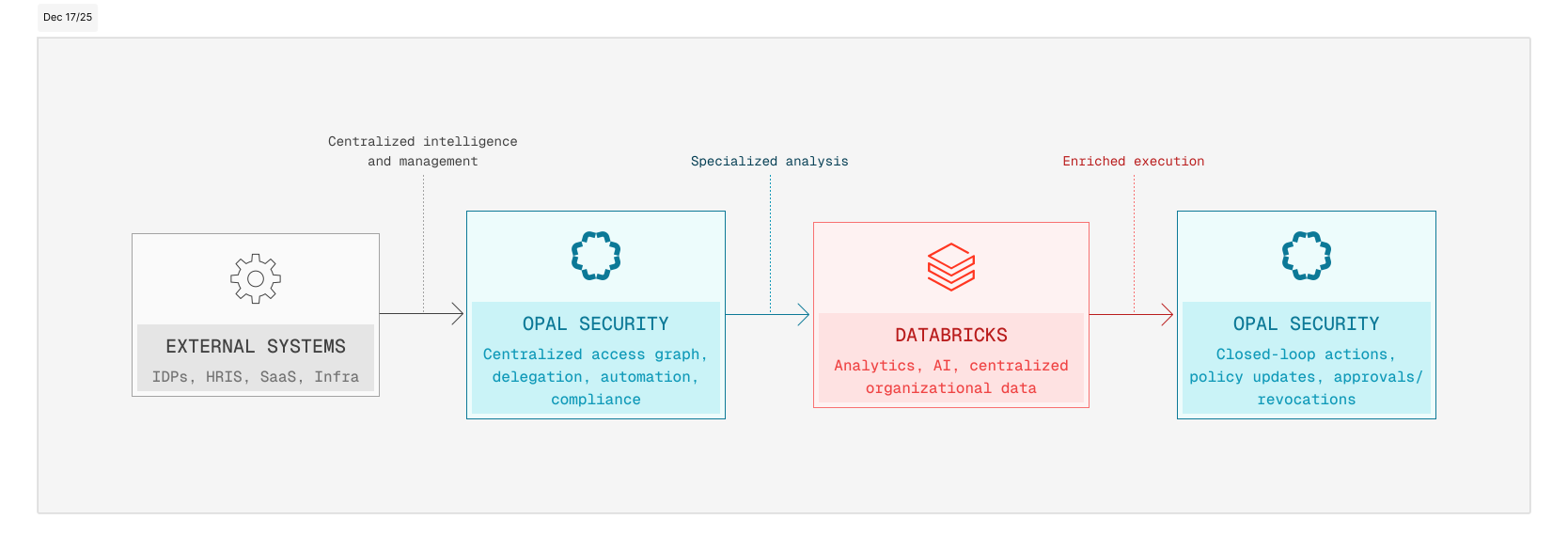
Introducing the Opal + Databricks Solution Accelerator

This accelerator provides a set of Databricks Notebooks that make it easy to load, model, and extend Opal data for deeper insights and custom analytics.

Included Notebooks

  • Opal Demo – Export Events.dbc - Ingests activity and approval events to track access behavior and decision trends.

  • Opal Demo – Export Users.dbc - Normalizes user metadata and attributes for cross-system correlation.

  • Opal Prod – Export Groups.dbc - Models group and role hierarchies for entitlement graph analysis.

  • Opal Prod – Export Owner Objects.dbc - Maps ownership relationships to resources, apps, and data assets.

  • Opal Prod – Export Owner Users.dbc - Links individuals to governed assets and responsibilities.

  • opal_functions.dbc - Provides shared helper functions for parsing, joining, and visualizing Opal data in Databricks.

With these notebooks, your Opal exports can be transformed into Delta tables and unified datasets – ready for queries, dashboards, and machine learning pipelines.

Why Start from Opal

Opal already serves as your source of truth for access intelligence, combining automated access controls, delegation workflows, and real-time visibility across identity providers and applications.

This integration builds directly on that foundation:

  • Centralized control: Opal remains the operational command center, managing approvals, ownership, and policies.

  • Actionable intelligence: Every analysis or model built in Databricks can write back recommendations or insights into Opal, turning data into real governance actions.

  • Analytics-enabled architecture: By exporting to Databricks, you extend Opal’s reach into enterprise data science and analytics ecosystems – without breaking your single source of truth.

What Databricks Adds

Databricks becomes the computational engine powering large-scale insight generation from Opal’s access graph, which allows you to:

  • Cluster and correlate identities across business units and systems.

  • Detect anomalies in access requests, ownership patterns, or privilege drift.

  • Optimize licensing and entitlements through usage-based modeling.

  • Automate governance by feeding analytic outputs (risk scores, utilization metrics, ML predictions) back into Opal workflows.

  • Unify access data with HR, security, and cost data for holistic governance dashboards.

Together, Opal + Databricks create a closed-loop identity intelligence system: one that not only visualizes access risk but actively mitigates it.

Getting Started

As an Opal and Databricks customer, the possibilities are endless, but it can be daunting to get started. So here’s a quick start notebook that can get you up and running within minutes – from zero to trimming the fat on licenses and overprovisioned access with tailored analytics and recommendations. Let’s walk through it together.

  1. Import the provided .dbc notebooks (GitHub) into your Databricks workspace.

  2. Configure your credentials and base_url to point to your Opal instance:

    1. Store your Opal API key using Databricks secrets and make sure you are retrieving the right scope and key in the opal_functions notebook.
      opal_secret = dbutils.secrets.getBytes('demo_scope', 'opal-key')

    2. In the opal_functions notebook make sure to set the base_url to your respective Opal API URL.
      connect_opal(base_url="https://demo.opal.dev", token=opal_secret.decode())

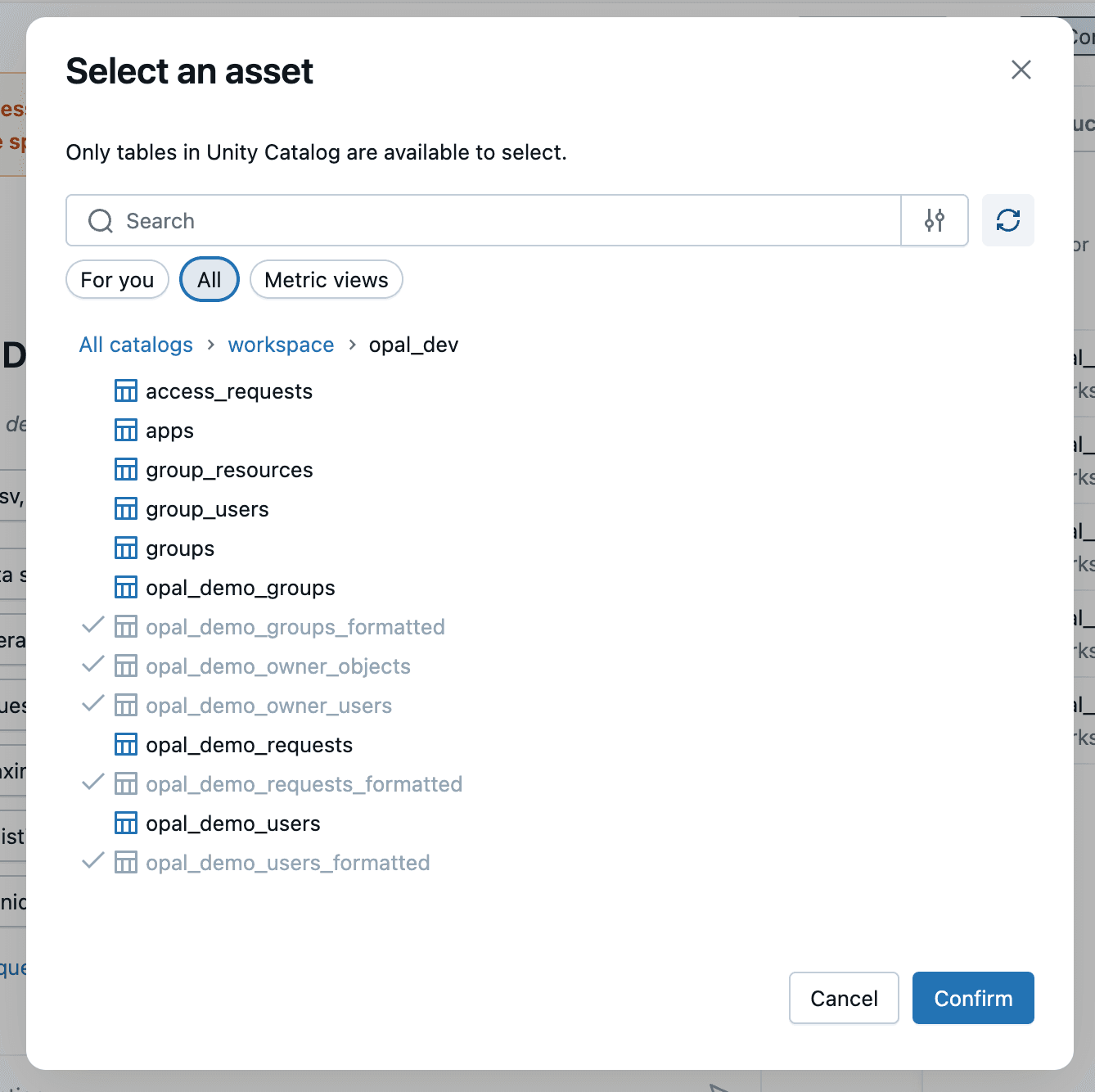
  3. Run the notebooks to create curated Delta tables such as opal_users, opal_groups, opal_events, and opal_owners.

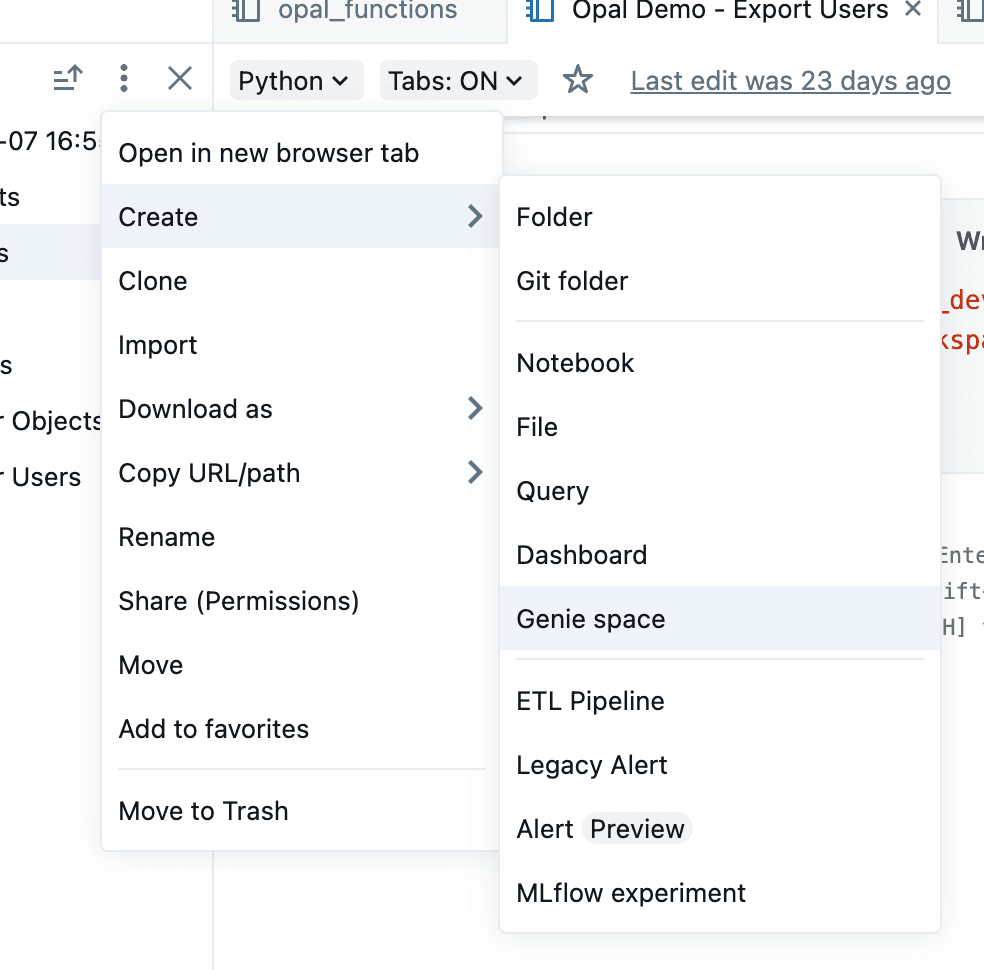
  4. An easy way to start exploring the data is to create an Opal Genie space in the workspace and selecting the tables above.
  1. Build on top with custom queries, dashboards, or ML pipelines — or feed enriched insights and actions back into Opal’s governance engines. A few example use cases:

    1. Customized Predictive Risk Scoring – Use ML to forecast which users or roles are likely to drift from least privilege, enriched with organization-specific context and additional data sources

    2. Cost & License Optimization – Quantify and right-size underutilized access or SaaS subscriptions.

A Unified, Intelligent Control Plane

When combined, Opal and Databricks give enterprises a full-spectrum solution for identity observability and control. Most IAM systems stop at visibility. Opal goes further… it acts. When you combine that action layer with Databricks’ intelligence layer, you get a self-tuning access governance engine that continuously improves security, compliance, and efficiency.

Together, they bring more context and functionality, supporting your organizational security with a living, intelligent IAM system.

This is the next generation of identity operations: centralized, data-driven, and adaptive.

Learn how to analyze Opal access data in Databricks notebooks, to better understand access drift and other patterns in your access graph.

Identity and access management data is one of the richest, most underutilized assets inside modern enterprises. It tells the story of who has access to what, why, and how that access evolves over time, but too often, it’s challenging to bring the right business context into the security and access flows. 

  • Opal already solves this fragmentation by acting as a centralized, actionable control plane for access across the enterprise.

  • By layering Databricks on top, organizations can now extend Opal’s governance and automation capabilities with advanced analytics, AI, and large-scale data enrichment.

Together, Databricks and Opal help you answer questions about your identity security landscape. Start by using Opal’s integrations to secure sensitive resources with Just-in-Time access. Opal’s sophisticated data layer can be viewed, modified, and systematized right in the app, while Databricks Notebooks let you flexibly analyze all your access and identity data in a Python notebook environment you’re already familiar with.

The Opportunity

Opal Security provides centralized visibility and control into who has access to what at any given time, and while it also provides a strong foundation of analytics and intelligent recommendations, Databricks can supercharge the automation and personalization by leveraging the rich access data under Opal’s hood, enriching it with additional organizational data, and actioning on it in an automated way using the Opal API or CLI.

Introducing the Opal + Databricks Solution Accelerator

This accelerator provides a set of Databricks Notebooks that make it easy to load, model, and extend Opal data for deeper insights and custom analytics.

Included Notebooks

  • Opal Demo – Export Events.dbc - Ingests activity and approval events to track access behavior and decision trends.

  • Opal Demo – Export Users.dbc - Normalizes user metadata and attributes for cross-system correlation.

  • Opal Prod – Export Groups.dbc - Models group and role hierarchies for entitlement graph analysis.

  • Opal Prod – Export Owner Objects.dbc - Maps ownership relationships to resources, apps, and data assets.

  • Opal Prod – Export Owner Users.dbc - Links individuals to governed assets and responsibilities.

  • opal_functions.dbc - Provides shared helper functions for parsing, joining, and visualizing Opal data in Databricks.

With these notebooks, your Opal exports can be transformed into Delta tables and unified datasets – ready for queries, dashboards, and machine learning pipelines.

Why Start from Opal

Opal already serves as your source of truth for access intelligence, combining automated access controls, delegation workflows, and real-time visibility across identity providers and applications.

This integration builds directly on that foundation:

  • Centralized control: Opal remains the operational command center, managing approvals, ownership, and policies.

  • Actionable intelligence: Every analysis or model built in Databricks can write back recommendations or insights into Opal, turning data into real governance actions.

  • Analytics-enabled architecture: By exporting to Databricks, you extend Opal’s reach into enterprise data science and analytics ecosystems – without breaking your single source of truth.

What Databricks Adds

Databricks becomes the computational engine powering large-scale insight generation from Opal’s access graph, which allows you to:

  • Cluster and correlate identities across business units and systems.

  • Detect anomalies in access requests, ownership patterns, or privilege drift.

  • Optimize licensing and entitlements through usage-based modeling.

  • Automate governance by feeding analytic outputs (risk scores, utilization metrics, ML predictions) back into Opal workflows.

  • Unify access data with HR, security, and cost data for holistic governance dashboards.

Together, Opal + Databricks create a closed-loop identity intelligence system: one that not only visualizes access risk but actively mitigates it.

Getting Started

As an Opal and Databricks customer, the possibilities are endless, but it can be daunting to get started. So here’s a quick start notebook that can get you up and running within minutes – from zero to trimming the fat on licenses and overprovisioned access with tailored analytics and recommendations. Let’s walk through it together.

  1. Import the provided .dbc notebooks (GitHub) into your Databricks workspace.

  2. Configure your credentials and base_url to point to your Opal instance:

    1. Store your Opal API key using Databricks secrets and make sure you are retrieving the right scope and key in the opal_functions notebook.
      opal_secret = dbutils.secrets.getBytes('demo_scope', 'opal-key')

    2. In the opal_functions notebook make sure to set the base_url to your respective Opal API URL.
      connect_opal(base_url="https://demo.opal.dev", token=opal_secret.decode())

  3. Run the notebooks to create curated Delta tables such as opal_users, opal_groups, opal_events, and opal_owners.

  4. An easy way to start exploring the data is to create an Opal Genie space in the workspace and selecting the tables above.


  1. Build on top with custom queries, dashboards, or ML pipelines — or feed enriched insights and actions back into Opal’s governance engines. A few example use cases:

    1. Customized Predictive Risk Scoring – Use ML to forecast which users or roles are likely to drift from least privilege, enriched with organization-specific context and additional data sources

    2. Cost & License Optimization – Quantify and right-size underutilized access or SaaS subscriptions.

A Unified, Intelligent Control Plane

When combined, Opal and Databricks give enterprises a full-spectrum solution for identity observability and control. Most IAM systems stop at visibility. Opal goes further… it acts. When you combine that action layer with Databricks’ intelligence layer, you get a self-tuning access governance engine that continuously improves security, compliance, and efficiency.

Together, they bring more context and functionality, supporting your organizational security with a living, intelligent IAM system.

This is the next generation of identity operations: centralized, data-driven, and adaptive.

Find out why the best security teams manage access with Opal

Find out why the best security teams manage access with Opal

Find out why the best security teams manage access with Opal

Find out why the best security teams manage access with Opal