" width="9.333999999999946px"><path d="M 0 0 L 0 9.334" fill="transparent" height="9.334000000000003px" id="Ho_4eUERn" stroke-dasharray="" stroke-linecap="butt" stroke-linejoin="round" stroke-width="1.2" stroke="rgb(35, 41, 51)" transform="translate(4.5 0)" width="1px"/><path d="M 0 0 L 4.667 4.667 L 9.334 0" fill="transparent" height="4.667000000000002px" id="q4SooRAjE" stroke-dasharray="" stroke-linecap="square" stroke-linejoin="round" stroke-width="1.2" stroke="rgb(35, 41, 51)" transform="translate(0 4.5)" width="9.333999999999946px"/></g></svg>)


Every security team has a version of the same recurring conversation. An auditor asks, "Show me everyone with access to PCI-scoped systems." A VP asks, "Who on the platform team has admin access to production?" An incident responder asks, "Does this user have access to anything else sensitive?"
The answer is always the same: "Give us a few hours."
Not because the data doesn't exist—it does, scattered across identity providers, cloud platforms, and access management systems. The problem is that asking a question about access is unreasonably expensive. You file a ticket with engineering. Someone writes a custom SQL query or stitches together API calls. The results arrive in a spreadsheet that's already stale by the time you open it.
OpalQuery changes the economics of that question. Type what you're looking for in plain English, get structured results in seconds, and export them for your audit binder before the auditor finishes their coffee.
Update — May 28, 2026: OpalQuery is now generally available.
The Access Visibility Gap
Most organizations have invested heavily in controlling access—approval workflows, just-in-time provisioning, automated reviews. But seeing access? That's still surprisingly hard.
Building multi-condition filters across entity types, access relationships, and permission levels requires familiarity with the data model. If you're a GRC analyst preparing for an audit, or an IT admin troubleshooting a provisioning issue, the learning curve is a blocker. You end up asking someone else to run the query for you, which defeats the purpose of self-service.
The result is that access visibility becomes a bottleneck. Teams rely on periodic reports—weekly, monthly, quarterly—that are out of date the moment they're generated. There's no way to query the live state of access on demand, and no way for non-technical users to explore the access graph without help.
OpalQuery: Natural Language Meets Structured Precision
OpalQuery is an AI-powered query environment embedded directly in Opal. You describe what you're looking for in plain English, and OpalQuery translates your intent into a precise, composable query against Opal's identity and access graph.
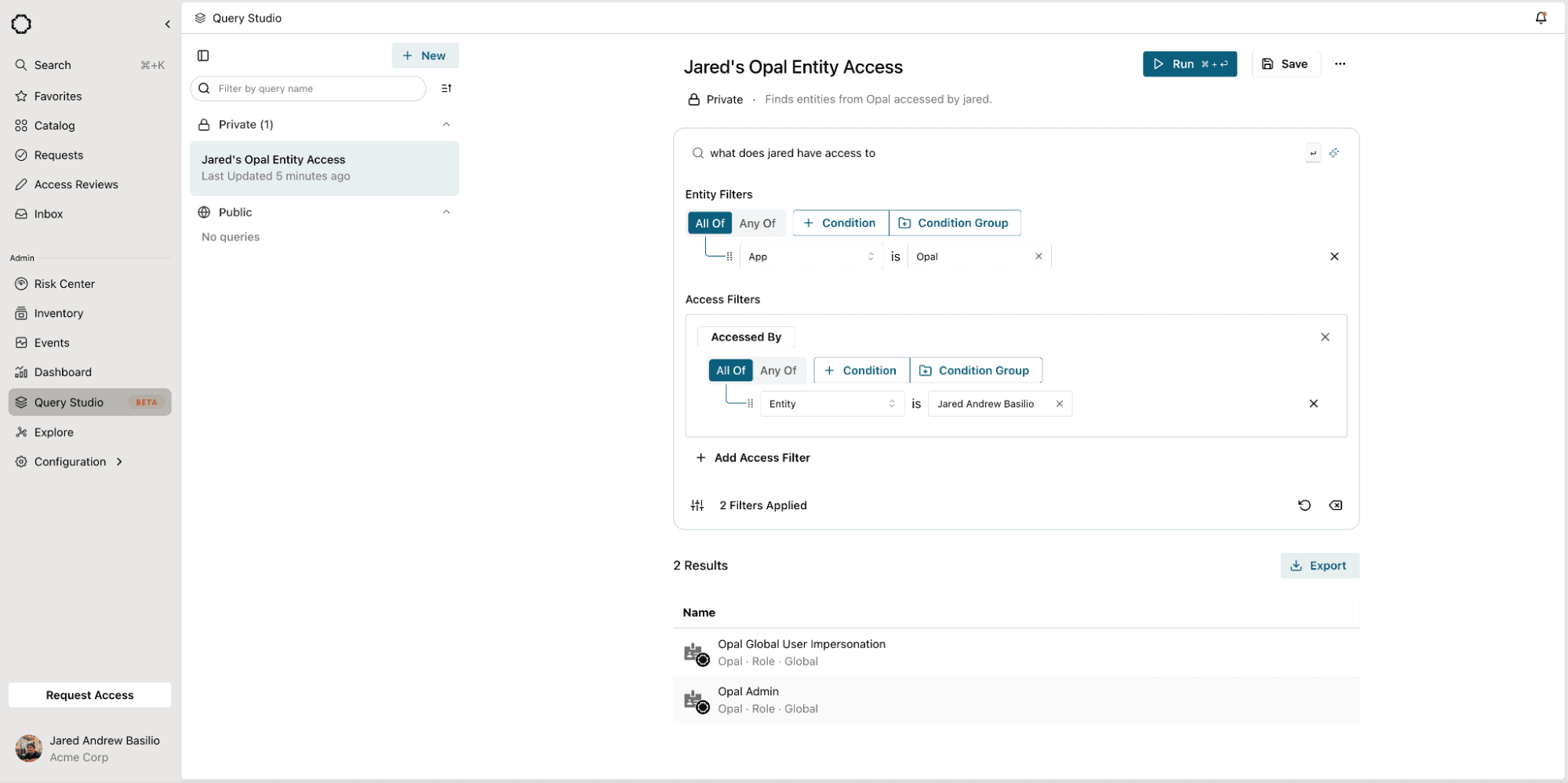
Here's what makes it different from a chatbot or a search box: the AI always shows its work. Every natural language query is decomposed into visible, editable structured filters. You can inspect the AI's interpretation, adjust it, add conditions, and re-run—all before a single query executes. There's no black box.
Type "show me all okta groups with the tag team:engineering" and OpalQuery generates two structured filters: Entity Type is 'Okta Group' AND Entity Tag is 'team:engineering'. You can see exactly what it built, modify it if needed, and click Run.
How It Works
OpalQuery's interface has three layers that work together:
Natural language search. A search bar at the top of the workspace accepts plain-English questions. The AI translation engine parses your intent, resolves entity references against your organization's actual resource and group catalog, and populates the structured filter panels below. If you ask for "users with access to Engineering Production," it resolves "Engineering Production" to the specific resource in your Opal environment—not a fuzzy guess.
Structured filter builder. Entity Filters define what types of entities to return (users, resources, groups) with composable boolean logic—AND/OR grouping, nested condition groups, drag-and-drop reordering. Access Filters define the relationships those entities must satisfy: "Has Access To" or "Accessed By," with their own boolean composition. You can build queries entirely by hand if you prefer, or use the AI as a starting point and refine from there.
Results and export. Click Run and results appear instantly in a tabular view with inline identity cards—display name, email, color-coded avatar. Click any row to navigate directly to that entity's detail page in Opal. When you're ready, hit Export and download the full result set as a .zip archive, timestamped and ready for audit evidence.
AI That Assists, Not Decides
OpalQuery's AI is opinionated about transparency. A few design choices worth calling out:
Every query is reversible. After the AI generates filters from your natural language input, an undo control lets you revert the changes instantly. You're never locked into the AI's interpretation.
Filters are the source of truth. The AI populates structured filters—it doesn't execute hidden logic. What you see in the filter panels is exactly what runs. If the AI misinterprets your intent, you'll see it before any query executes.
AI-generated metadata. Beyond filters, the AI also generates query titles and descriptions from your current filter state. Click the sparkle icon next to the title field and it produces something like "Users Starting With A" based on your filters. Small feature, but it makes saved queries actually findable later.
Graceful limits. If the AI can't confidently parse your query, it tells you. Unsupported queries are logged so the team can expand coverage over time, rather than silently returning bad results.
Saved Queries and Shared Knowledge
One-off queries are useful. Reusable queries are powerful.
OpalQuery lets you save any query—filters, natural language prompt, title, and description—to a personal or shared library. Private queries are visible only to you. Public queries are visible to every admin in your organization, creating a shared repository of investigative patterns that anyone can run.
The left sidebar organizes your query library with search and sort controls, so the query you built last quarter for SOC 2 evidence is one click away when audit season comes around again.
What You Can Ask
OpalQuery operates against Opal's unified identity and access graph, which means you can query across users, resources, and groups from every connected system. A few examples of the kinds of questions it handles:
"Show me all users with access to Engineering Production and AdministratorAccess" — finds users satisfying multiple access conditions simultaneously
"Get me all resources that Person X has access to" — explores an individual's access footprint
"List all Google Groups that this user belongs to" — filters by app and entity type in a single query
"Users whose name contains 'admin'" — string-based pattern matching across your identity graph
"Users with access to both payment processing and payment approval" — surfaces toxic access combinations for separation of duties analysis
Entity filters support properties like Entity Type, Entity Name, App, and Entity Tag. Access filters support "Has Access To" and "Accessed By" relationships with full boolean composition. And because the structured builder is always visible, you can combine AI-generated filters with manual conditions to construct queries the AI alone might not produce.
Built for Audit Season
If you've ever spent a day assembling access evidence for an auditor, OpalQuery is built for you.
The workflow: type a natural language question that matches the auditor's ask, review the structured filters, run it, and export the results. The export is a timestamped .zip archive with the full result set in a structured format—ready to drop into your evidence repository. You can also kick off the export from the kebab menu without re-running the query, which matters when you're working through a checklist of twenty evidence requests.
Saved public queries mean you can prepare your standard audit queries once and re-run them each cycle. No more rebuilding from scratch every quarter.
What's Next
OpalQuery launched in Beta on March 17, 2026, available to Super and Read-Only Admins, and is now generally available. Here's where we're headed:
Scheduled queries and result diffing. Run a query on a recurring schedule and get notified when results change. "3 new users gained admin access to production since last week" is the kind of signal that shouldn't require someone to remember to check.
Action from results. Today, OpalQuery is read-only. In future releases, you'll be able to take action directly from results—revoke access, initiate a review, or create an access policy—without navigating away.
Query-to-policy pipeline. Promote a saved query into a standing policy or access review scope. "All users with admin access to production databases" becomes both your audit evidence query and your quarterly review population.
Getting Started
OpalQuery is generally available today. Create a new query, type what you're looking for, and learn more about your company’s entitlements, roles, groups, and more broadly: your access and identity fabric.
New to Opal and want to try OpalQuery? Reach out to your account team to schedule a demo or visit our documentation to learn more.